Getting Started with the KITFS0400A0EVM Evaluation Board
Contents of this document
-
Out of the Box
-
Get Hardware
-
Configure Hardware
Sign in to save your progress. Don't have an account? Create one.
Purchase your KITFS0400A0EVM
1. Out of the Box
The NXP analog product development board provides an easy-to-use platform for evaluating NXP products. The board supports a range of analog, mixed-signal and power solutions. They incorporate monolithic integrated circuits (ICs) and system-in-package (SiP) devices that use proven high-volume technology. NXP products offer longer battery life, a smaller form factor, reduced component counts, lower cost and improved performance in powering state-of-the-art systems.
This page will guide you through the process of setting up and using the KITFS0400A0EVM board.
1.1 Kit Contents
- Assembled and tested KITFS0400A0EVM evaluation board (soldered rev. D) in an antistatic bag with the following Power Management Integrated Circuit (PMIC) setup:
- One FS04 (U1), soldered
- One PF53 (U3), soldered, with PPF5300AMMALES One-Time Programmable (OTP) configuration
- One PF53 (U4), soldered, with PPF5300AMMAMES OTP configuration
- Fully assembled of FRDM-KL25Z
- USB-STD A to USB Type-C cable
- Jumpers required for board configuration
- Nylon spacers and screws
1.2 Additional Hardware
In addition to the kit contents, the following hardware is necessary or beneficial when working with this kit:
- One power supply with a range up to 40 V and a current limit initially set to 1.0 A.
1.3 Minimum System Requirements
This evaluation kit requires a Windows PC workstation with a USB connection.
1.4 Software
Before working with this evaluation board, software must be installed. All listed software is available on the KITFS0400A0EVM evaluation board's information page. Refer to the evaluation board's user manual for instructions for installing and running the software.
- NXP graphical user interface (GUI), latest version
2. Get Hardware
2.1 Board Features
The KITFS0400A0EVM evaluation board allows a user to:
- Configure an evaluation environment that meets specific design requirements using the connectors, jumpers and switches on the board
- Monitor the system performance in real time using the LEDs and test points on the board
2.2 Kit Overview
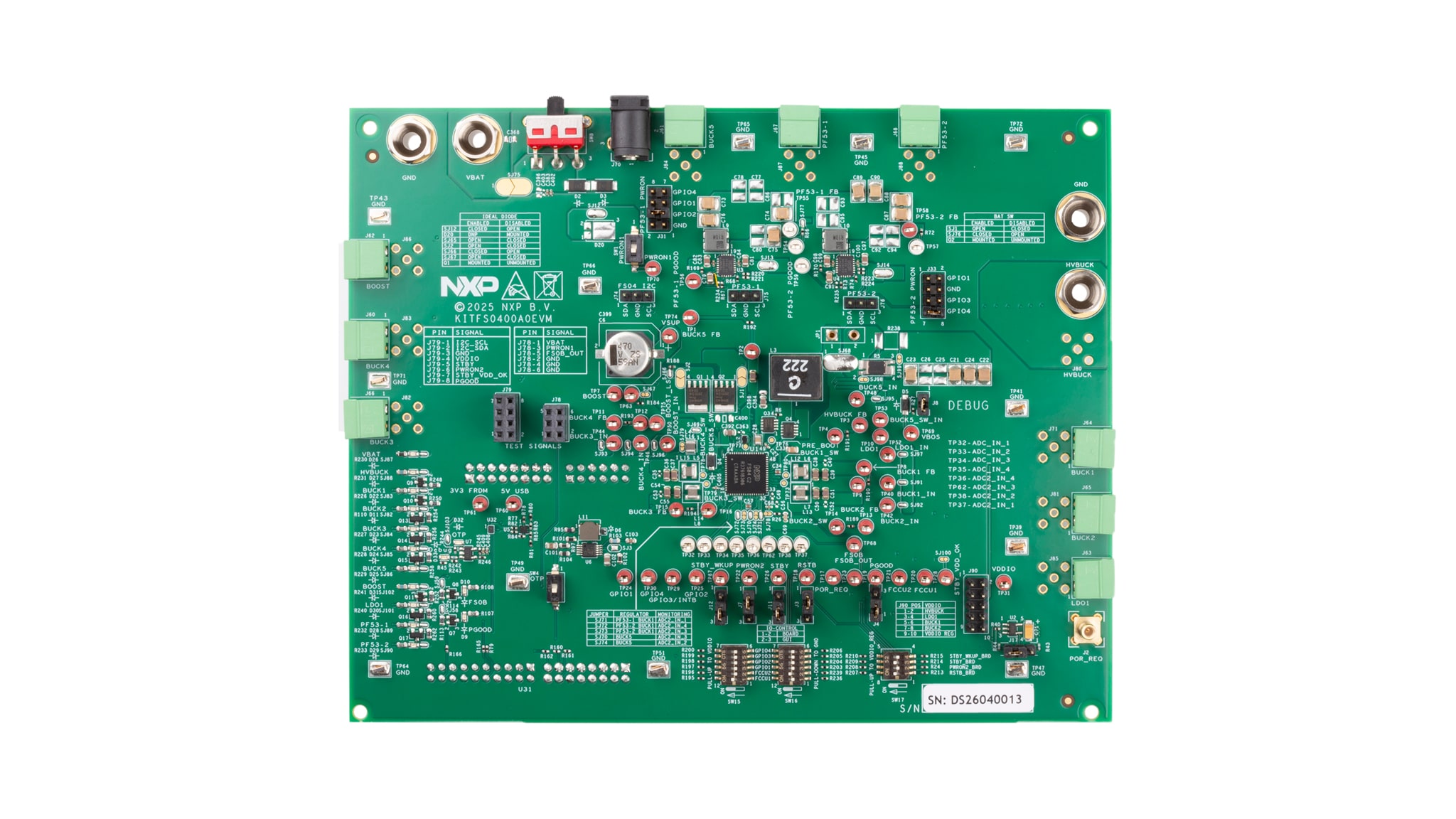
The KITFS0400A0EVM kit provides an integrated platform for evaluating designs based on NXP’s FS04 high voltage ASIL D PMIC for the S32N processor.
The KITFS0400A0EVM kit also accommodates two PF53s to facilitate evaluation of the FS04 at a system level.
The KL25Z freedom board can be connected to the bottom side of the KITFS0400A0EVM. The KL25Z provides the interface between the FS0400 PMIC device and the NXP GUI, using the inter-integrated circuit (I²C) channel.
The KL25Z can also be configured to command and monitor various I/O channels. It can supply 1.8 V or 3.3 V supply voltage (VDDIO) and provide 8 V for the one-time programmable memory supply pin (VDDOTP) pin (after regulators).
The default configuration for the jumpers and switches is provided in Figure 1 of this document.

Configure Hardware
3.1 Mounting the Spacers
Four spacers and screws are supplied with the kit. These spacers and screws are there to be mounted in each corner of the board, serving as a base.
3.2 Setting Up Jumpers into Default Configuration
The jumpers required to configure the board are provided with the kit. Figure 1 shows the default jumper and switch configuration.
3.3 Mounting the KL25Z
Once the KL25Z firmware is flashed, the KL25Z board should be mounted onto the bottom side of the FS04 evaluation board using the corresponding connectors.

3.4 Launching the Setup
To launch the setup, the typical hardware procedure is to:
- Connect the KL25Z on the development board to the Windows PC workstation via USB
- Connect the VBAT connector of the development board to the power supply In the initial hardware configuration, the KL25Z is providing:
- I²C communication and I/O connections
- 5.0 V used to generate VDDIO voltage level at 3.3 V or 1.8 V using an external regulator, to generate OTP 8.0 V from an external regulator, and to supply the signaling LEDs
- 3.3 V voltage level for the level shifters between the PMIC and the KL25Z
Design Resources
Board Information
Additional Reference
- KITFS0400A0EVM — detailed information on this board, including documentation, downloads, and software and tools: FS04
- FS04— detailed information on FS04, high- voltage ASIL D PMIC for the S32N processor: FS04
- FS04 data sheet — detailed information on data sheet: FS04 Documentation
- FS04 device design guidelines — detailed information on device design guidelines: FS04 Documentation